Epson L300 Driver
- Windows: 7, 8, 10, 11
- Version: L300
Among single-function printers, the Epson L300 is one of the most innovative, being brought to market in 2010. The home and small office markets were transformed with the release of the L300 due to its revolutionary integrated ink tank system. Along with the rest of Epson’s first L-series printers, the L300 was one of the first attempts to respond to the problem of rapidly escalating prices of ink cartridges.
The L300 tackles such issues by providing the user with large-volume ink bottles in place of small, cost prohibitive ink containers. Fortunately, the user is now able to print tens of thousands of pages, allowing the L300 to gain an fvor of educators, students and administrators.
In addition to its cost advantages, the L300 was built with an emphasis on engineered efficiency and robustness. The compact design of the printer allows the user to claim printing space in most of their available work zones. The L300 was developed to retain its printing capabilities for many years unlike most inexpensive printers that neglect quality construction. The L300 is an ideal combination of construction and modern printing.
Features and Highlights
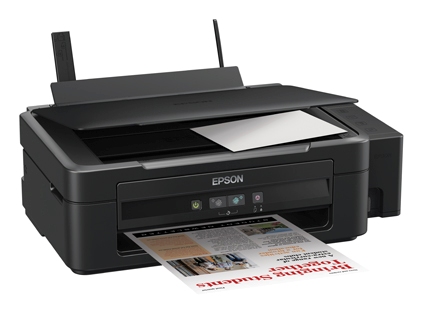
1. Built-in Ink Reservoir System
Epson L300 users enjoy a completely different way of printing thanks to the Built-in Ink Reservoir System. Instead of using replaceable cartridges, the L300 utilizes a large, refillable, side-mounted tank. Customers no longer have to deal with the stress of running out of ink while printing. This system assures that customers have a continuous supply of ink, while other printers utilize thermal inkjet cartridges that have many interruptions.
Customers can refill side-mounted tanks quickly with a proprietary design that incorporates a drop-free nozzle. The design of the bottle even allows for easy alignment with the tank for a completely spill-free experience when refilling the tank. This system gives users the ability to see how much ink is available at any time. Because of this system, the L300 has one of the lowest costs for ink per page on the market. For this reason, the Built-in Ink Reservoir System decreases the average cost of printing for customers.
2. Micro Piezo print head Technology
Epson’s proprietary Micro Piezo print head technology provides a competitive edge over other print head technologies on the market. Instead of boiling ink and causing it to be forced through nozzles like thermal inkjet printers, Micro Piezo employs electrical pulses to vibrate the piezo element and thus causes ink to be dispensed. In addition to being heat free, which saves energy, the Micro Piezo system has a longer operational life than thermal head systems since print heads do not undergo thermal expansion / stress cycles that can cause failure.
High precision ink droplet generation creates clear and sharp text as well as rich imagery. Because of the technology employed, it has the capability to create ink droplet sizes to achieve in detail and clear imagery. It is industrial-grade technology that has earned the L300 printer a reputation as a printer to produce professional-quality documents in large quantities and to maintain the quality of the documents over and over.
3. Exceptional High Page Yield
The L300 provides more productivity than any of the other entry-level competitors. L300 offers the highest page yield in it’s class, due to the capability of printing 4000 pages in black and 6500 pages in color using a single set of removable ink bottles. This also provides more value to home users due to huge reduction in Product purchase frequency, eliminating the need to replace ink bottles on a more strict basis than expected.
The L300’s printing costs and workflow interruptions are minimized by infrequent user ink replacements. This allows small businesses to economically print documents (reports and invoices) and promotional materials in bulk.
4. Print Speeds vs. Work Efficiency
The L300 is one of the best printers in its class with a print speed of 33 pages per minute (ppm) and 15 ppm for color. This is ideal for a small office with a large amount of printing that needs to be done in a small amount of time.
The L300 provides a rhythm of printing that meets the high standards of businesses that print in high quality. This is due to its consistent output of high-quality pages in all settings of the printer (including high quality and standard quality). It’s ideal for businesses that print a large amount of pages and need a high quality of print and an equally high quality of time from the printer.
5. Efficient Use of Space
Epson understands how valuable desktop space can be. That’s why we made the L300 with a more compact chassis design. The L300 has a much smaller footprint than previous models with external ink tanks because we integrated the ink tank into the printer body. This allows you to keep the L300 sitting in a bookshelf, a corner desk, or a hot desk in a shared office space.
The printer definitely has a compact design, but it does not feel flimsy or cheap. Its solid construction protects the more delicate inner mechanisms of the printer, and the foldable paper trays keep the printer clean and tidy when not in use. This printer is built to be functional and aesthetically pleasing in a modern minimalist office.
6. Optimized Energy Use
Sustainability is a key design feature of the L300. As a direct result of the earlier mentioned Micro Piezo technology, the printer uses extremely low amounts of power while it is operating – typically around 10W while printing. This is a stark contrast to laser printers, which use significant amounts of power to heat the fuser unit.
Lower power consumption means lower costs and less environmental impact. Epson’s commitment to environmentally friendly office solutions is shown with their L300 model. In some cases, the L300 is ENERGY STAR® compliant. For the environmentally conscious consumer, the L300 model is an environmentally friendly product that is paired with impressive functionality.
Pros
- Power consumption is low
- Refilling the model is easy and mess-free
- It is compact and lightweight
- The micro piezo print head is reliable
- Page yield is impressive
- The cost per page is extremely low
Cons
- The purchase price is higher than some models that use cartridges
- There is no scanner or copier
- The model cannot perform automatic duplex printing
- There is no LCD screen to monitor
- The print head dries and clogs when the model is not used for an extended period
- The pre-installed drivers support printing for all versions of Windows and Mac.
- There are no built-in Wi-Fi or networking features
FAQs
Is wireless printing supported by the Epson L300?
- The L300 is only capable of USB printing.
Which ink bottles does it use?
- It is compatible with the Epson T664 series ink bottles for all colors.
Is photo printing supported?
- Printing photos is supported, although the model is designed specifically for document printing.
Is Windows 11 compatible?
- The model supports Windows 11. Driver availability is confirmed for all updated Window and Mac versions.
What can be done for print head clogging issues?
- It is advisable to print one page at least weekly to encourage flow of ink.
Will there be ink included in the box?
- Yes, usually a complete set of ink bottles is included at the time of purchase.
Are ink tanks refillable?
- Yes, the tanks are integrated and designed to be refilled rather than exchanged.
Is there an automatic document feeder?
- No, there is just a basic rear-loading paper tray.
Can I use aftermarket ink?
- It can be done, but in order to protect the print head and warranty, it is recommended to use Epson ink.
How fast does it print?
- It can print 33 pages per minute in black and 15 pages per minute in color.
Download Epson L300 Driver for Windows
The Epson L300 demonstrates that high-quality printing and low printing cost can coexist. The integrated ink tank is one of the best ways of dealing with high-volume printing when taking the cost of cartridges into consideration.
Sure, modern features, such as wireless printing and scanning, are lacking, but the primary functionality of the L300 is solid, and high-volume printing for serious home office users is reliable. Epson’s reputation for reliability and low cost-per-page printing makes the L300 a device that will guarantee a good return on investment. You can click the link below to download Epson L300 Driver for Windows:
This program is also available in
Similar to Epson L300 Driver
- App Name Epson L300 Driver
- License Freeware
- App Name Epson L300 Driver
- Publisher Seiko Epson
- Updated
- Version: L300